OttoKit Free vs. Pro: Which Plan Should You Choose in 2026?


Upgrading to OttoKit Pro transforms simple WordPress automation into an industrial-grade system capable of managing complex, intelligent multi-step workflows. This upgrade allows you to break free from task limits and centralize the management of multiple sites via a fully managed platform. The major benefit lies in access to AI agents and advanced conditional logic : essential tools for agencies seeking to maximize their profitability. A key differentiator: the Pro plan includes 10,000 monthly tasks and an unlimited number of connected sites.
Is your WordPress site held back by repetitive manual processes that you could delegate to a machine? This OttoKit Free vs. Pro comparison analyzes the differences between the two plans to help you choose the automation engine best suited to your growth. We break down how this SaaS solution connects your favorite plugins and third-party applications to transform your daily workflow into an autonomous, high-performance system.
Summary of our OttoKit Free vs. Pro comparison
Choosing between free access and performance is a common trade-off when automating WordPress. OttoKit offers an accessible entry-level plan, but the Pro version truly unlocks the tool’s full potential.
The main sticking point is the monthly task limit. Your choice will therefore depend directly on your site’s activity volume. The free plan’s limits quickly hinder serious growth.
Investing in a paid plan offers an immediate ROI for professionals. More than just a cost, it’s a formidable driver of efficiency.
| Criterion | OttoKit Free | OttoKit Pro | Verdict |
|---|---|---|---|
| Monthly tasks | Limited | 5,000 tasks | Pro for volume |
| Active workflows | Capped | Unlimited | Pro for scaling |
| AI agents | Not included | Included | Pro for intelligence |
| Conditional logic | Basic | Advanced | Pro for precision |
| Support | Standard | Priority | Pro for peace of mind |
| Connected sites | Single site | Multi-site | Pro for agencies |
Features of OttoKit Free and OttoKit Pro
After this quick overview, let’s take a closer look at what each version has under the hood.
Task Volume and Workflow Limits
The free plan offers 1,000 monthly tasks, a generous quota to get started. However, heavy users will quickly hit this strict limit, restricting their daily automated operations.
Upgrading to Pro unlocks unlimited workflows. You can then run multiple automations simultaneously without fear of technical bottlenecks, ensuring smooth growth for your WordPress infrastructure.
Exceeding the limit cuts off your workflows. This is the critical point for your business.
AI Agents and Multi-Step Automation
AI agents, exclusive to the Pro plan, transform the way you work. They process text data intelligently, marking a major technological breakthrough for WordPress. You gain greater decision-making insight.
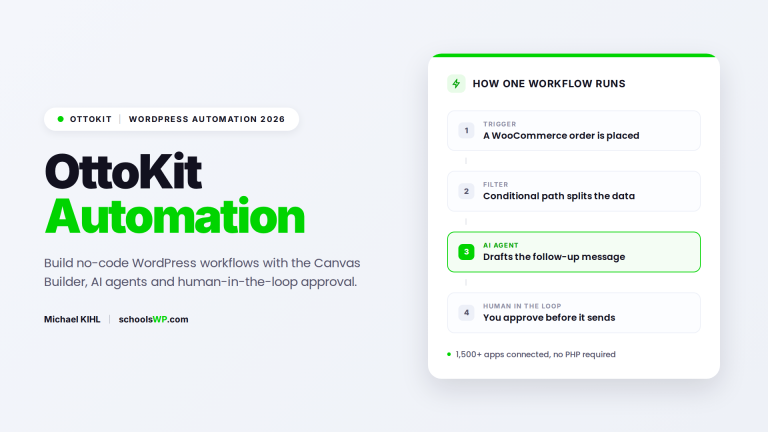
The Pro version supports complex multi-step sequences. We go beyond simple triggers to create truly efficient, sophisticated workflows, chaining actions across multiple applications without human intervention.
Conditional logic offers total flexibility. Your automation can finally adapt to every specific situation.
OttoKit Free
If your budget is tight, the free version remains a very solid starting point.
Capabilities for simple automation needs
Connect your contact forms to a basic email marketing tool. For a solo blogger, these basic integrations are more than enough for day-to-day use. Simplicity trumps quantity here.
This is the ideal use case. You can test the interface without spending a dime to validate your initial workflows.
Learning to manage your WordPress automations effectively is a key point of comparison. For a deeper dive on the WordPress integration angle, see the official OttoKit for WordPress page.
Technical limits and connectivity restrictions
You’ll quickly hit the limit on the number of connected sites. Being limited to a single site becomes frustrating for a freelancer managing multiple clients. Upgrading to a higher plan then becomes inevitable.
Technical support isn’t a priority. In the event of a critical bug, you’ll have to wait longer than a Pro user. The free plugin itself lives on the official WordPress.org repository, so install and removal stay one click away.
OttoKit Pro
To take things to the next level, the Pro plan offers enterprise-grade tools.
Conditional logic and advanced webhooks
Decision filters customize your flows. The action is triggered only if your criteria are met. This gives you total control.
Connecting via webhooks expands your possibilities. Connect any third-party service not included in native integrations. It’s absolute flexibility.
Data retention and debugging tools
Extended execution history safeguards your operations. You can now track down an error that occurred ten days ago. This provides real management convenience.
Detailed logging clarifies every step. You can instantly understand why a workflow failed. Diagnosis is immediate.
A standalone OttoKit review is on the schoolsWP roadmap. In the meantime, this comparison covers the trade-offs that matter most for your WordPress automations.
Data retention
Free workflows keep execution logs for a short window only. The Pro plan extends history retention significantly, so you can investigate a failed automation that ran ten days ago instead of losing the trail after twenty-four hours. For agencies managing client sites, longer retention turns post-mortem debugging from guesswork into evidence.
Team collaboration
OttoKit Pro adds team seats so multiple operators can build, edit, and monitor automations under a shared workspace, without sharing a single login. This matters as soon as a developer, a marketer, and a project manager all touch the same FluentCRM or WooCommerce workflows. Permission separation also reduces the risk of accidental edits on production automations.
OttoKit Free vs. OttoKit Pro: What’s the Price Difference?
Let’s cut to the chase: is the investment really worth it?
Cost-effectiveness and return on investment
The cost per task drops drastically with the Pro plan. As you scale from 1,000 to 5,000 executions, each automation becomes more cost-effective. It’s a pure volume calculation.
Estimate your weekly time savings. If the tool frees up three hours of manual work, the subscription pays for itself immediately. Your time is worth more than the price of the software.
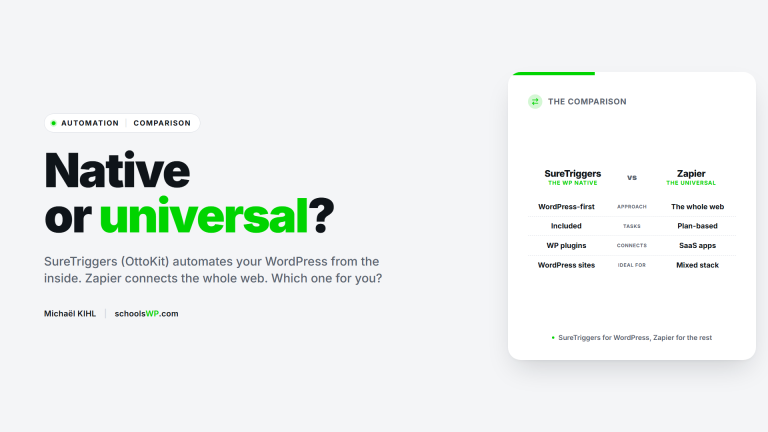
Check out this SureTriggers vs. Zapier comparison to analyze the prices. OttoKit remains very competitive.
Flexible plans and upgrade options
Upgrading to the next plan is a breeze. You can switch plans with a single click without any technical hurdles. The system adapts instantly.
Your current settings remain intact during the transition. No data is lost when upgrading to Pro. Your workflows continue to run without interruption.
Customer Reviews
Nothing beats the feedback from those who use the tool every day.
Feedback on the free user experience
The no-code interface immediately impresses with its clarity. The visual interface makes it very easy to get started. This is a major advantage for beginners who don’t want to code.
However, quota limits quickly put a damper on things. Many users soon feel restricted. Upgrading to a paid plan becomes inevitable.
- Visual simplicity
- Quick setup
- Frustration with quotas
Perception of the Pro version’s added value
Technical support receives praise for its responsiveness. Experts resolve complex workflows in under two hours. This support reassures professionals.
Production stability remains a key selling point. Workflows run smoothly on cloud servers. This ensures reliability for your automations. Independent feedback follows the same trend on G2, where OttoKit averages 4.5 stars on production usage.
Check out our blog for more reviews.
Should you buy OttoKit Free or OttoKit Pro?
Finally, let’s decide based on your actual profile and your goals online.
The ideal profile for the free version
Solo freelancers with a single website are best off choosing the free plan. It’s the perfect solution to get started at no cost.
Use this plan for your initial testing phases. Validate your automations before pulling out your credit card.
Discover OttoKit Free to launch your first workflows right now.
Why agencies and e-commerce businesses should upgrade to Pro
Managing multiple clients requires strict centralization to stay efficient. The Pro plan lets you manage different WordPress sites from a single interface. This saves vital time by avoiding the need for multiple isolated accounts.
Artificial intelligence is radically transforming WooCommerce management. Automating your product listings or transactional emails boosts your daily productivity.
Here are the key benefits of upgrading:
- Multi-site
- AI Agents
- Advanced Logic
Choosing OttoKit Pro unlocks the power of AI agents and advanced webhooks for your unlimited sites. While the free version handles your initial workflows, the Pro plan supports your growth with 10,000 monthly tasks and VIP support. Automate without limits today to transform your WordPress productivity for the long term.
Questions? I have the answers.
Get answers to a list of frequently asked questions.