Ninja Tables DataTables: Manage Your Large Datasets


The native integration of the DataTables engine in version 5.2.8 allows you to manage hundreds of thousands of rows without slowing down, thanks to AJAX server-side rendering. This technology offloads the browser by processing SQL queries directly in the database. Bulk imports become completely secure thanks to a “chunk” system that prevents PHP memory from becoming overloaded.
Managing massive volumes of data on WordPress often runs into browser memory limits. The integration of Ninja Tables DataTables makes all the difference by shifting complex processing to the server to ensure total fluidity. This 5.2.8 update transforms your tables into high-performance interfaces capable of handling thousands of rows without the slightest slowdown.
Why the Ninja Tables DataTables engine makes all the difference
After exploring the basics of Ninja Tables, it’s time to understand why Ninja Tables DataTables represents a significant performance leap for your site.
Server-side rendering via AJAX to offload the browser
AJAX processing changes everything. Instead of loading the entire table, the server sends only the visible rows. This prevents the visitor’s RAM from becoming overloaded.
The browser no longer has to process thousands of tags simultaneously. Performance remains smooth, regardless of the data volume. The load is drastically reduced.
Rendering time drops. This is ideal for resource-intensive WordPress sites. You gain speed without sacrificing the depth of your data.
Differences between the classic engine and Ninja Tables DataTables
Classic mode loads everything into the DOM. In contrast, DataTables queries the SQL database directly. Every sort becomes instantaneous on large volumes.
For under 500 rows, the classic mode is sufficient. Beyond 1,000 rows, the DataTables engine becomes an absolute necessity for the stability of your interface.
A heavy DOM hurts SEO. DataTables maintains a lightweight HTML structure. This facilitates indexing while preserving the overall user experience.
| Critère | Classique | DataTables |
|---|---|---|
| Vitesse | Variable | Instantanée |
| Mémoire | Navigateur | Serveur |
| Volume | < 500 | > 1000 |
| SEO | Lourd | Léger |
3 settings for managing pagination and data search
Now that we’ve established the technical superiority, let’s see how to actually configure these tools to provide a smooth browsing experience for your users.
Enabling the engine on your existing WordPress tables
Go to the settings of your Ninja Tables table. Simply check the “Rendering Engine” option and select DataTables to enable server-side processing features. This is the foundation of this comprehensive guide to Ninja Tables DataTables.
The search bar now queries the columns via optimized SQL queries. This is much more powerful than a simple JavaScript filter executed in the browser. Your server is finally working intelligently for the user.
Your visual settings and content remain intact during the change. Only the rendering method changes, ensuring a seamless transition without any loss of work. You gain performance without having to rebuild anything.
Configuring advanced filters and sorting by type
You can add date selectors or specific numerical ranges. This allows visitors to segment complex data in just a few clicks. It’s highly effective for ensuring the clarity of your information.
The plugin identifies whether the column contains text or numbers. Alphabetical or numerical sorting adjusts automatically to prevent classification errors. Your data remains consistent and professional.
Users can filter multiple categories simultaneously. This flexibility greatly improves the usability of complex WordPress dashboards or catalogs.
- Date filters
- Price sliders
- Category dropdown menus
- Exact keyword search

*Enter the code schoolsWP20 at checkout.
How to import CSV files without overloading PHP memory?
Managing large datasets often starts with importing, a daunting step that can, however , go off without a hitch.
How chunked importing works
Chunked import splits your large CSV file into small segments. This method prevents you from exceeding the memory limits allocated to your PHP script. It’s an essential safety measure.
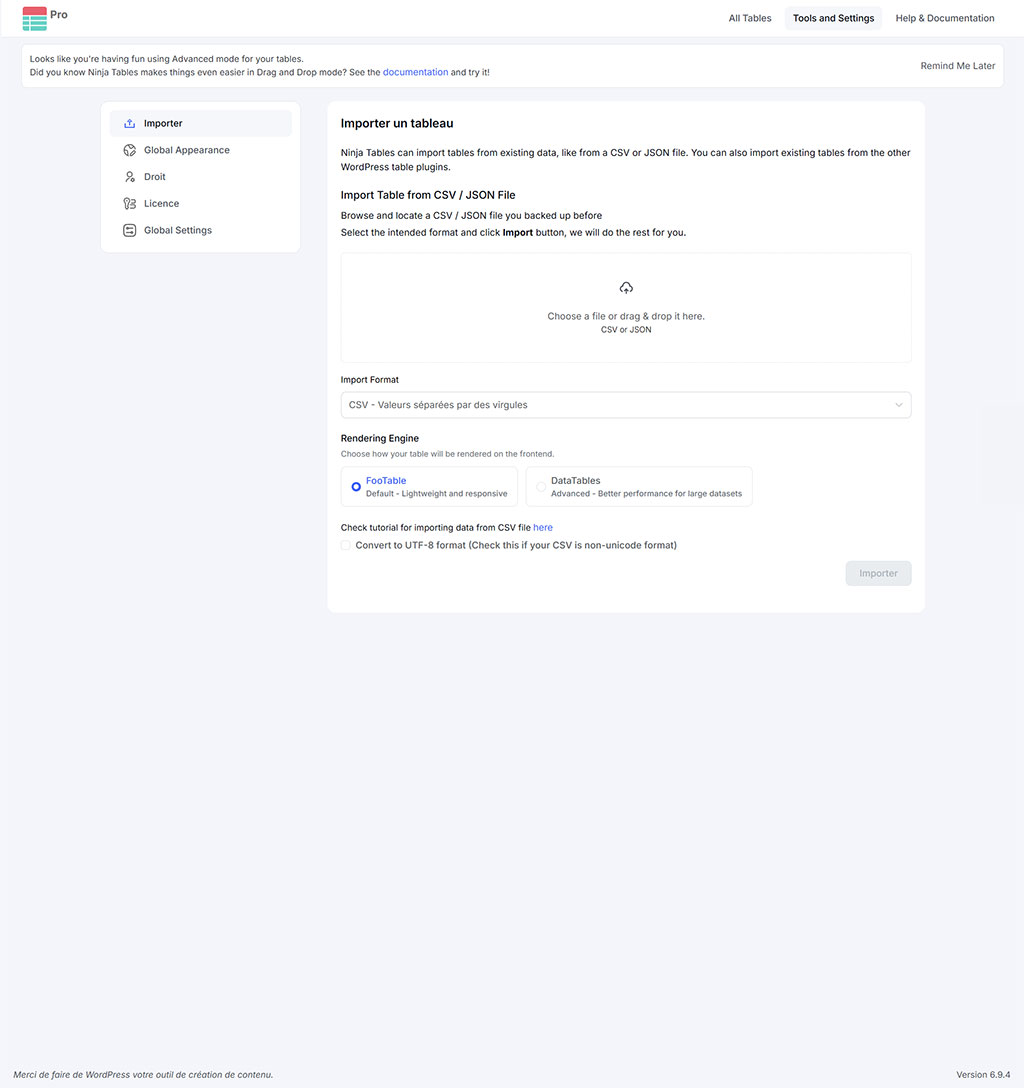
Each block is inserted sequentially into the WordPress database. The system waits for one cycle to finish before starting the next. This ensures the complete integrity of your data.
Resource consumption remains stable throughout the process. You no longer risk a white screen or a 500 error. Your bulk imports are finally a breeze.
Using batch import is the only reliable way to import more than 10,000 rows into WordPress without crashing your server.
Preparing CSV files for error-free import
Make sure your headers are clear and free of complex special characters. A well-structured file makes column mapping much easier. This is the foundation of a successful initial setup.
You can upload your file directly to WordPress. Ninja Tables then retrieves the local path to process the data. This method via the media library enhances the security of the process.
Increase the PHP execution time if necessary. Often, a simple change in the .htaccess file is enough to resolve interruptions. This prevents timeout errors during processing.
- Cleaning up duplicates
- UTF-8 encoding required
- Checking delimiters (comma or semicolon)
- Test on a small sample
Customize the display and design in DataTables mode
Despite its raw technical power, Ninja Tables DataTables doesn’t compromise on the aesthetics and adaptability of your tables across all devices.
Responsive design with stackable cards on mobile
Stackable mode transforms your rows into vertical cards on smartphones. Columns become stacked label-value pairs. This eliminates horizontal scrolling, which drives users away. It’s an essential feature for mobile usability.
A “+” icon activates expandable rows to display hidden details. The design remains compact while maintaining access to technical information. This ensures that important data is always available to your visitors.
Smart hiding lets you prioritize information based on screen width. You choose which columns disappear first. You retain full control, even with WordPress page builders.
Conditional styles and integration with the Gutenberg editor
Define automatic visual rules for your cells. A color can change if a value exceeds a specific threshold. This is perfect for highlighting low stock or promotions. The presentation immediately becomes more meaningful.
Inserting via Gutenberg makes managing your content easier. Use the dedicated Ninja Tables block directly in the WordPress editor. You can also insert a table via shortcode into any WordPress widget.
CSS customization lets you add your own classes for borders. Feel free to modify fonts to match your brand guidelines. DataTables remains compatible with your style sheets without causing major conflicts. You can even pair it with the FluentCart integration for interactive tables linked to your products.
The integration of DataTables into Ninja Tables Pro 5.2.8 streamlines the management of large volumes thanks to server-side AJAX rendering and incremental importing. Activate this engine now to ensure absolute fluidity and optimized SEO. Transform your WordPress tables into high-performance, sustainable interfaces.
*Enter the code schoolsWP20 at checkout.
Frequently Asked Questions
Concrete answers about the DataTables engine and chunked import.